
Published: July 2026 | Category: Product Review | Reading Time: 9 min
You open your prayer app to find the Qibla direction. Your phone buzzes with an ad for halal restaurants. Another notification pings. The app takes 12 seconds to load. Then you realize: your phone's storage is full because this app is 150MB.
Sound familiar? Millions of Muslims face this every day. The problem isn't prayer apps — it's that most prayer apps aren't built for prayer. They're built for engagement metrics, data collection, and monetization.
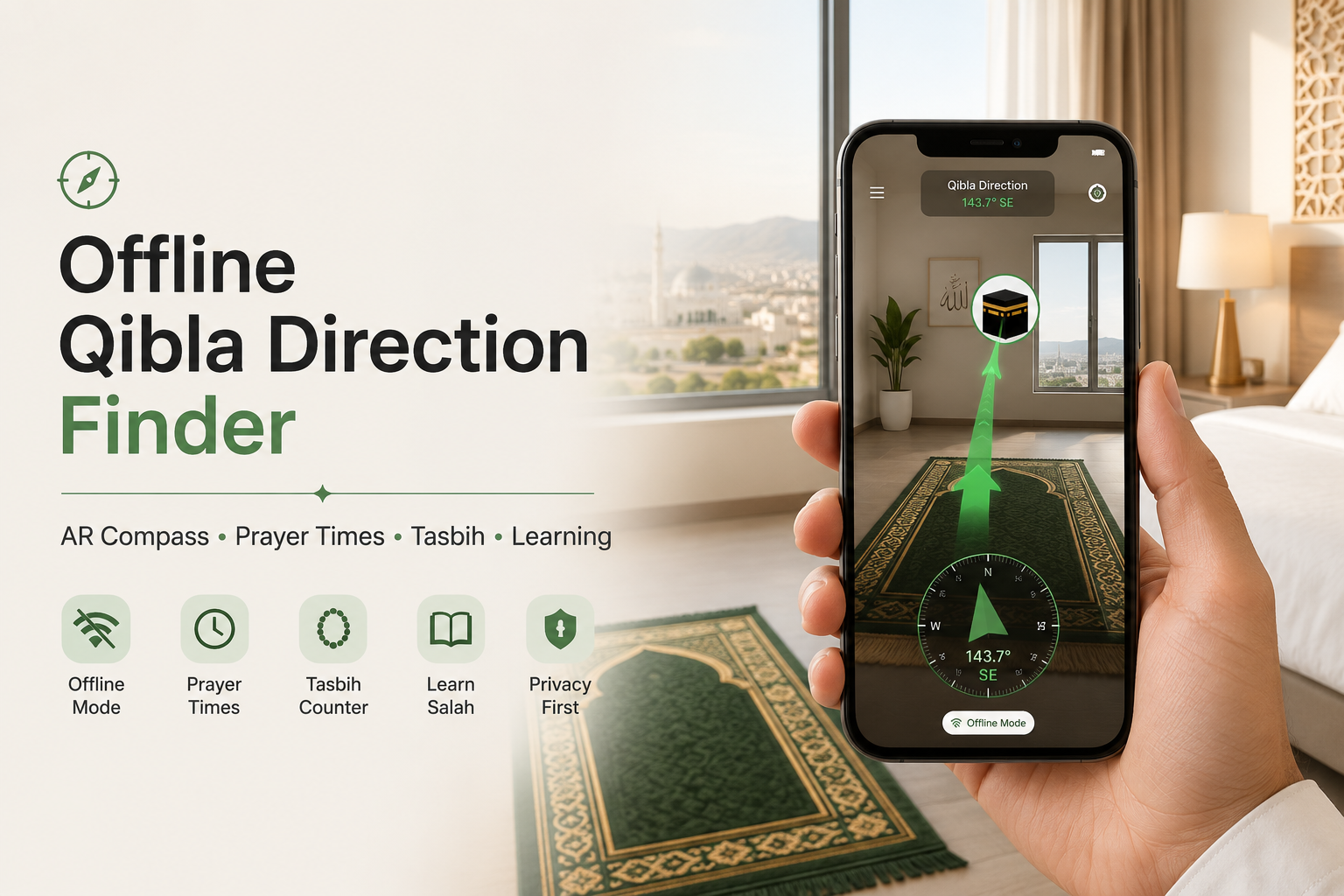
What if there was a different approach? An offline Qibla app that uses AR for direction, calculates prayer times without internet, tracks your Dhikr, and teaches you how to pray — all in 8MB. No ads. No data collection. Just prayer.
That's Qibla Finder Pro. This is a complete product review covering everything: how it works offline, why the AR compass matters, what the tasbih + learning features actually do, and how it stacks against bloated alternatives.
Key Takeaways
- Spiritual wellness apps are growing at 14.66% annually, reaching $2.89B in 2026 (toward Health & Wellness Market Report, 2026) — but most sacrifice privacy and performance for features
- 68% of app users worry about data collection and tracking practices (IAPP Privacy Survey, 2025) — making offline-first, privacy-conscious apps increasingly attractive
- Qibla Finder Pro is lightweight (8MB), fully offline, AR-enabled, and includes integrated tasbih + prayer learning — solving the "feature bloat vs. privacy" problem in one focused app
The Problem: Why Most Prayer Apps Fail Muslims in 2026
Muslim Pro has 170+ million downloads. It's the gold standard, right?
Not anymore. In 2020, Vice reported that Muslim Pro was sharing user location and prayer data with third parties. The app's CEO addressed this publicly in April 2025, saying they "never shared individual data." But once trust breaks, it's hard to rebuild (FINCHANNEL, April 2025).
Then there's the app itself. Bloated. Heavy. Draining battery. Full of ads in free tiers. Designed to keep you scrolling, not praying.
Meanwhile, a new generation of Muslims want something different:
- Privacy. Your prayer times and location shouldn't be monetized. They're sacred.
- Offline. Prayer doesn't need the internet. Why should your app?
- Speed. A prayer app should load in under 2 seconds, not 12.
- Focused. No endless scrolling. No gamification. No engagement loops designed to addict you.
- Complete. One app for Qibla, prayer times, tasbih counting, and learning how to pray — without compromise.
Qibla Finder Pro delivers on all five. Here's how.
What Makes Qibla Finder Pro Different: The Core Philosophy
Minimalist design isn't new. But in 2025-2026, it's become a design principle — not an aesthetic (Groove Technology, May 2026). Designers are "scrutinizing every asset for energy cost, favoring lightweight vector graphics, system fonts, and fewer data requests."
Applied to prayer apps, this means:
- 8MB total size — 19x smaller than Muslim Pro. Your phone storage stays free. The app loads instantly.
- Dark mode built-in — Reduces eye strain, saves battery on OLED screens. Not an afterthought.
- No accounts, no login — No data collection. No servers tracking you. Your location data stays on your phone.
- Offline-first architecture — Prayer times calculate locally. Qibla direction works in airplane mode. AR compass doesn't touch the internet.
- One purpose, done well — Prayer-centric design, not engagement loops. Open app, find direction, know prayer times, count dhikr, learn how to pray. Done.
This is deliberate. Qibla Finder Pro is built around a principle: spiritual practice shouldn't compete with attention-harvesting. Your app should serve your prayer, not the other way around.
Feature 1: AR Qibla Compass — See Your Prayer Direction
AR in spiritual practice is booming. The global spiritual wellness app market grew to $2.89B in 2026, with AR integration accelerating adoption (Toward Healthcare, 2026). But most AR implementations are gimmicks. In Qibla Finder Pro, AR solves a real problem.
When you're praying indoors — in your bedroom, a hotel room, a mosque basement — a flat compass needle is hard to interpret. Which direction is "northwest"? Is the angle right?
AR fixes this. Point your phone's camera at the room around you. A live arrow appears on your screen, overlaying your actual surroundings. It shows exact Qibla direction in 3D space. You see it. You understand it instantly. You pray accurately.
How the AR Compass Works Offline
Your phone has two sensors:
- GPS — knows your exact latitude and longitude
- Magnetometer — knows which direction the phone is pointing
Qibla Finder Pro does the math once — calculating the great-circle bearing from your location to the Kaaba in Makkah (21.4225°N, 39.8262°E). This calculation happens entirely on your device. No internet needed. No server calls. The result is cached locally. From then on, the compass works forever offline.
The AR visualization? Also on-device. The camera feed is processed locally. The arrow is rendered by your phone's GPU. Nothing leaves your phone.
Three Ways to Find Qibla Direction
1. AR Camera Mode — Point your phone, see the direction live. Best for indoors, crowded spaces, unfamiliar rooms.
2. Compass Mode — Classic needle + degree display. Simple, fast, battery-efficient. Best for quick checks.
3. Map Mode — See a dotted line from your location to Makkah. Useful for understanding your bearing across long distances.
All three work offline. All three are instant.
Feature 2: Automatic Offline Prayer Times — No Pre-Download Required
Most prayer apps require you to pre-download prayer time data. Qibla Finder Pro's approach is simpler.
Prayer times are calculated algorithmically based on four inputs:
- Your GPS latitude and longitude
- Your GPS altitude (affects sun angle calculations)
- The current date
- Your chosen calculation method (ISNA, MWL, Umm Al-Qura, etc.)
The app does the math locally, in real time. Fajr, Dhuhr, Asr, Maghrib, Isha — all calculated instantly without touching the internet.
Automatic Mode vs. Manual Download
Automatic Mode (default): Prayer times calculate on-the-fly based on your GPS location. You'll see coordinates instead of city names (because the app doesn't have a location database offline). But times are accurate to the minute.
Download Mode (optional): If you want to see city names and prayer times for specific regions, you can optionally pre-download data for Pakistan, Malaysia, UAE, Turkey, and 190+ countries.
For daily use? Automatic mode is faster and just as accurate. For travelers who know their itinerary? Downloading specific regions adds a nice city-name display without being required.
Ramadan Integration
Ramadan isn't just another month. Qibla Finder Pro builds Ramadan features into the core:
- Sahur & Iftar countdown timers — Never miss pre-dawn or post-sunset again
- Fasting tracker — Mark days you fasted, track your consistency
- Taraweeh prayer times — Reminder for night prayers specific to your location
- Ramadan-specific adhkar — Curated duas for the holy month, accessible offline
Everything offline. Everything integrated into the base app (no expensive "Ramadan edition").
Feature 3: Digital Tasbih Counter — Track Your Dhikr
Digital tasbih counters are among the most downloaded Islamic apps. Users want to replace physical beads with something portable and trackable. But most tasbih apps are bloated, ad-heavy, or subscription-gated.
Qibla Finder Pro's tasbih is integrated cleanly:
- Tap to count — Each tap increments. Simple, tactile, familiar.
- Haptic feedback — Your phone vibrates subtly with each count, mimicking the physical feel of prayer beads.
- Preset dhikrs — Subhan'Allah, Alhamdulillah, Allahu Akbar, and others pre-loaded. Set a target (99, 100, 33 — whatever matches your practice).
- Custom dhikrs — Add your own duas or azkar. Name them, set targets, track progress.
- Session history — See your dhikr from today, this week, this month. Encourages consistency.
- No ads interrupting your zikr — Unlike many tasbih apps, Qibla Finder Pro doesn't show ads mid-count.
The key differentiator? It's built alongside the Qibla compass and prayer times, not bolted on as a separate feature. Open the app, you're one tap away from finding direction, knowing prayer time, or counting dhikr. No switching between apps.
Feature 4: Prayer & Wudhu Learning — Educational for Beginners and Reverts
Reverts to Islam need guidance. Kids learning to pray need clear steps. Even lifelong Muslims sometimes want to refresh their knowledge.
Qibla Finder Pro includes illustrated, step-by-step guides for:
- Wudhu (Ablution) — Each of the seven steps shown with clear visuals and transliteration. Audio pronunciation for Arabic terms.
- Salah (Prayer) — Fajr, Dhuhr, Asr, Maghrib, Isha. Each prayer broken down by rakat. Shows Takbir, Qiyam, Ruku, Sujud, Tashahhud. Text + audio + illustrations.
- Dua recitations — Common duas recited after prayer, with English translation and phonetic transliteration.
- For beginners — Simplified explanations of Arabic terms. No jargon overload.
All offline. All integrated. You're learning to pray in the same app that tracks your prayer times and Qibla direction.
This matters for reverts especially. Reverts need one trusted resource, not five different apps. Qibla Finder Pro provides that.
Why Qibla Finder Pro Beats the Alternatives
vs. Muslim Pro (170M+ users)
Size: 150MB vs. 8MB. Qibla Finder Pro is 19x smaller.
Privacy: Muslim Pro has documented data-sharing controversies (FINCHANNEL, 2025). Qibla Finder Pro collects zero data.
Battery: Muslim Pro's heaviness drains battery. Qibla Finder Pro's minimalist design extends battery life.
Design: Muslim Pro is feature-rich but cluttered. Qibla Finder Pro is focused — one app, one purpose, done well.
Cost: Muslim Pro's free tier has aggressive ads. Qibla Finder Pro's free tier has minimal ads.
vs. iQibla (Ad-Free Alternative)
AR Compass: iQibla doesn't have AR mode. Qibla Finder Pro does.
Prayer Learning: iQibla doesn't include wudhu or salah guides. Qibla Finder Pro does.
Tasbih Integration: iQibla is compass-only. Qibla Finder Pro bundles tasbih tracking.
Rating: Both strong (4.6+), but Qibla Finder Pro's complete feature set justifies the same rating across more use cases.
vs. Qibla Connect (Offline-First)
AR Mode: Qibla Connect doesn't have AR. Qibla Finder Pro does.
Learning Features: Qibla Connect focuses on prayer times. Qibla Finder Pro adds wudhu and salah learning.
Tasbih: Qibla Connect doesn't include tasbih. Qibla Finder Pro does.
Design: Qibla Connect's interface feels dated. Qibla Finder Pro uses modern, minimalist design.
vs. Google Qibla Finder (Browser-Based)
Offline: Google's web tool requires internet. Qibla Finder Pro works fully offline.
Features: Google's tool is compass + AR only. Qibla Finder Pro adds prayer times, tasbih, and learning.
Data: Google tool tracks you. Qibla Finder Pro doesn't.
Real-World Usage Scenarios
Scenario 1: Business Trip to Istanbul
You land in a new city. Your flight was delayed. Dhuhr prayer is in 45 minutes, and you've never been to this neighborhood.
Open Qibla Finder Pro. Automatic prayer time mode shows: "12:47 PM Dhuhr prayer." AR compass points you to a nearby mosque (or toward Kaaba from your hotel room). You get there on time, prayed accurately.
Zero internet used. Zero data sent. Zero ads.
Scenario 2: Ramadan, No WiFi
You're staying with family in rural Pakistan. Mobile data is spotty. You want Sahur and Iftar reminders, plus Taraweeh prayer times.
Open Qibla Finder Pro. Ramadan mode is active. Sahur countdown shows 25 minutes. Iftar countdown shows 8 hours. Taraweeh prayer time for your location is locked in. Everything works offline, automatically calculating for your GPS coordinates.
Scenario 3: Revert Learning to Pray
You converted to Islam three months ago. You know the basics, but you want to nail the Wudhu steps and make sure your Salah is correct.
Open Qibla Finder Pro. Tap "Learn Wudhu." Step-by-step visuals, audio, and transliteration walk you through each step. Then "Learn Salah." Video of the complete Fajr prayer, broken down by rakat. You practice along. By Friday, you're confident.
Technical Deep Dive: How Offline Works
True offline apps are rare. Most apps cache data, but still phone home constantly. Qibla Finder Pro is genuinely offline-first. Here's how:
On first launch: App boots, gets your GPS location once. Does all the calculations locally (Qibla bearing, prayer times for your location, etc.). Stores results in local device storage. Never touches the internet.
Prayer times: Algorithm runs on your phone's processor. No server needed.
Qibla direction: GPS + magnetometer data processed locally. The math (great-circle bearing from your location to 21.4225°N, 39.8262°E) is done on-device.
Tasbih tracking: Session data saved to device storage only.
Learning content: Wudhu and Salah guides are bundled in the app itself (all 8MB). Loaded from app package, not downloaded.
Result: Zero network requests after initial download. Works in Airplane Mode. Works when networks are congested (like during Hajj or Umrah). Works when international roaming costs $10/MB.
Minimalist Design Philosophy: Why It Matters for Prayer
In 2026, designers are moving toward "sustainable design" — building interfaces that "prioritize user wellbeing, reduce unnecessary cognitive load, and minimize addictive engagement patterns" (Fuselab Creative, 2026).
For a prayer app, this means:
- No infinite scroll. No "discover more content" feeds.
- No reward loops. No gamification, no streaks with social sharing (which turns prayer into performance).
- No notifications designed to pull you back. Only prayer time reminders (if you want them).
- No distracting design. Dark theme by default, minimal color, generous white space. Your eyes rest while praying.
- One tap to what you need. Open app, tap "Qibla," "Prayer Times," "Tasbih," or "Learn." No buried menus.
Prayer shouldn't compete with your attention. Your app should get out of the way and serve your prayer, not extend your session time.
Privacy: What Data Does Qibla Finder Pro Collect?
None. Qibla Finder Pro requires no account, no login, and no permissions beyond GPS (for Qibla calculation) and access to your phone's sensors (for compass).
Your location data stays on your device. It's never sent to servers. It's never sold. It's never shared.
This contrasts sharply with Muslim Pro's documented data-sharing practices and most free-tier Islamic apps' heavy-handed analytics. Privacy concerns are rising: 68% of app users worry about data collection (IAPP, 2025). Qibla Finder Pro doesn't give them anything to worry about.
Frequently Asked Questions
Does Qibla Finder Pro really work offline, completely?
Yes. After initial download, the app works fully offline. Prayer times calculate locally. Qibla direction works in Airplane Mode. Tasbih tracking, learning content, and Ramadan features all work offline. No internet required ever after download.
What happens if I travel to a new country?
The app automatically recalculates prayer times and Qibla direction based on your new GPS location. Automatic mode doesn't care where you are — it calculates for any coordinates on Earth. If you want city names displayed, you can optionally download regional data for Pakistan, Malaysia, UAE, Turkey, or other countries.
Can I use Qibla Finder Pro in Airplane Mode?
Yes. GPS and magnetometer work in Airplane Mode. Prayer times calculate offline. AR compass works. Tasbih tracking works. The only thing you can't do is optionally download new prayer time data (that requires a connection).
Is the AR compass accurate indoors?
AR accuracy depends on your phone's GPS chip and magnetometer calibration. In strong GPS signal (outdoors), accuracy is within 1-2 degrees. Indoors with weak GPS, use the compass or map mode instead (which still work offline). Always calibrate your phone's compass by moving it in a figure-8 pattern before critical prayer.
Who is this app designed for?
Anyone who values privacy, speed, and focused design. Especially: reverts learning to pray, travelers needing reliable offline tools, Muslims concerned about data collection, and anyone frustrated with bloated apps.
What if I want the learning features in another language?
Qibla Finder Pro's learning content is available in English and Arabic. Multi-language support for additional languages may come in future updates based on community request.
The Verdict: Best Offline Qibla App with AR Compass, Prayer Times, Tasbih & Learning
Qibla Finder Pro solves a real problem: the gap between "lightweight, offline, privacy-first app" and "complete Islamic toolkit."
You get:
- ✅ AR Qibla compass (works offline, visually accurate indoors)
- ✅ Automatic prayer time calculation (offline, no pre-download needed)
- ✅ Tasbih counter integrated (dhikr tracking, session history, haptic feedback)
- ✅ Wudhu & Salah learning (step-by-step, visual, for beginners and reverts)
- ✅ Ramadan features (Sahur/Iftar countdown, fasting tracker, Taraweeh times)
- ✅ 8MB total size (19x smaller than Muslim Pro, no storage bloat)
- ✅ Zero data collection (truly private, no servers tracking you)
- ✅ Dark mode default (battery-efficient, eye-friendly, minimal distractions)
- ✅ Minimalist design (does prayer, not engagement loops)
This is what happens when you build a prayer app for prayer, not for metrics. When you prioritize privacy over monetization. When you respect your user's attention.
Whether you're a digital nomad praying in hotel rooms, a revert learning salah for the first time, or a lifelong Muslim tired of bloated alternatives — Qibla Finder Pro delivers.
Download Qibla Finder Pro Free on Google Play →
Your prayer time is precious. Your data is sacred. Your app should protect both.