
Published: July 2026 | Category: Feature Announcement | Reading Time: 9 min
You're working at your desk. Prayer time is approaching. You pull out your phone, unlock it, open Qibla Finder Pro, navigate to the prayer screen, and check the time. It's 2:45 PM — Asr prayer is at 4:30 PM. You have time. You put your phone away.
Five minutes later, you're focused on work. You forget about the prayer time. By 4:15 PM, you realize Asr is starting in 15 minutes and you haven't prepared yet. The moment passes. You miss the optimal time.
This is a real problem. Opening an app every time to check prayer times is friction. And friction kills habit.
What if your next prayer time was always visible on your home screen? One glance. Live countdown. No app needed. Just see that Asr is in 30 minutes and adjust your day accordingly.
That's what Prayer Time Widgets do. Qibla Finder Pro now offers two powerful home-screen widgets that bring your prayer schedule to your fingertips — literally always on your home screen, updating in real-time, showing you exactly when your next Salah begins.
Key Takeaways
- Prayer Time Widgets display your next prayer with live countdown on your home screen — no app opening required.
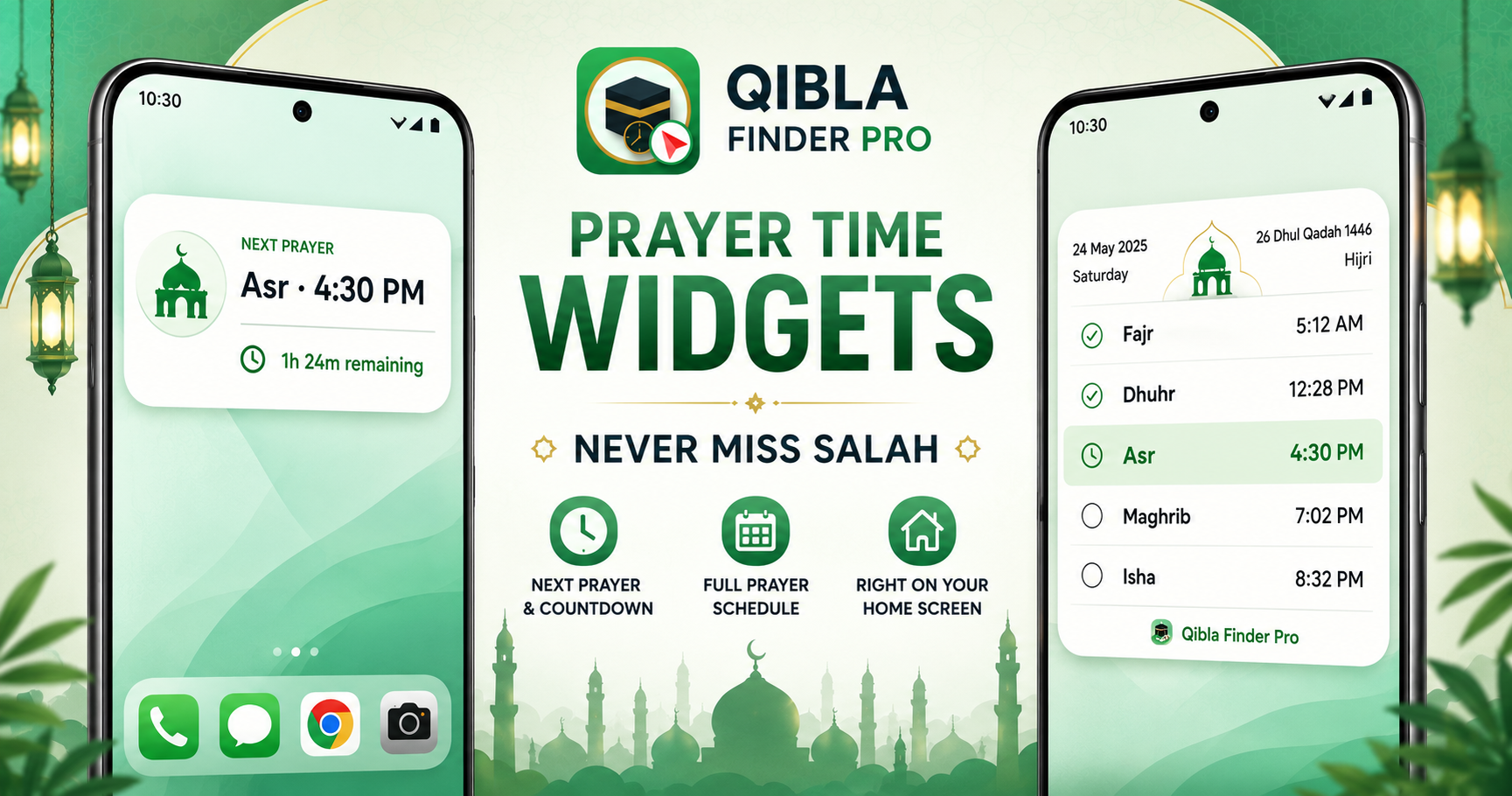
- Two widget options: Next Prayer Widget (current + next prayer with countdown) and Prayer Schedule Widget (full day Fajr-Isha with Hijri/Gregorian dates).
- Automatically refreshes minute-by-minute, works offline after setup, customizable (color, theme, text size), and available on Android 6 through Android 16.
- Premium feature that respects your attention: see prayer times without endless notifications or app engagement loops.
The Problem: Opening an App to Know Prayer Time Defeats the Purpose
Traditional prayer apps fail at one critical moment: the moment you need to check a prayer time without friction.
Muslim Pro, Athan, iQibla — they all require the same workflow: unlock phone, find app, open app, wait for load, navigate to prayer screen. By the time you see the information, you've already broken focus.
And if you rely on notifications? You get bombarded with alerts. Five minutes before prayer. Two minutes before prayer. The prayer started. It's over. The constant interruptions make users turn off notifications entirely — defeating the purpose of reminders.
Prayer widgets solve this completely. Your prayer times live on your home screen. One glance. Always updated. Zero notifications. Zero app opening. Pure information, pure intention.
Introducing Prayer Time Widgets: Two Options for Your Home Screen
Qibla Finder Pro now offers two home-screen widgets, live starting today.
Widget 1: Next Prayer Widget (Live Countdown)
This is simplicity. Your home screen shows:
- Current prayer name — What salah is happening right now (or "Next" if between prayers)
- Prayer time — Exact time of the next prayer
- Live countdown — "1h 24m remaining" until that prayer. Updates automatically every minute.
- One-tap access — Tap the widget to open the full Prayer screen for details
That's it. No clutter. No extra information. Just what you need: when is my next prayer, and how long until it starts?
Perfect for: Quick checks throughout your day. At work, at home, traveling — glance at your home screen and know exactly where you stand with prayer times.
Widget 2: Prayer Schedule Widget (Full Day View with Indicators)
If you want the complete picture, this widget shows your entire prayer day at a glance.
- Gregorian and Hijri dates — Know which date you're on in both calendars
- Full prayer schedule — Fajr, Dhuhr, Asr, Maghrib, Isha with exact times for each
- Visual indicators — Passed prayers marked clearly, upcoming prayers highlighted so you know which is next
- One-tap access — Tap to open the Prayer screen for full details, Adhan settings, or Ramadan times
This widget is your prayer schedule made portable. No opening the app. It's always there.
Perfect for: Family households (everyone sees the prayer times), Ramadan planning (Sahur/Iftar visible at a glance), travelers knowing prayer times across time zones, anyone who likes a daily prayer overview on their home screen.
How Prayer Widgets Work: Live, Automatic, Offline
Prayer time widgets aren't static. They're alive. They update automatically, minute-by-minute, throughout your day.
Live Countdown That Actually Works
The Next Prayer Widget countdown refreshes automatically. You don't tap refresh. You don't wait. The numbers count down in real-time: "1h 24m" → "1h 23m" → "1h 22m" and so on.
The moment a prayer time starts, the widget updates to show that prayer as current. After Isha ends, the widget resets and shows tomorrow's Fajr. All automatic. All without you touching your phone.
Automatic Location Refresh
If you travel, your prayer times change. Prayer widgets account for this. When you move to a new location (detected by GPS), the widget automatically recalculates prayer times for your new coordinates.
You don't need to manually refresh. You can optionally tap to force an immediate refresh if you want, but the widget stays current automatically.
Completely Offline After Setup
Prayer time calculation is math. Once Qibla Finder Pro calculates your prayer times for your location (which happens on first setup with internet), the calculations run locally on your device. Widgets work offline. No internet required after that initial setup.
Traveling to areas with no service? Your prayer times still show. Airplane mode enabled? Widgets keep working. Battery saver mode? Widgets keep working.
Feature 1: Next Prayer Widget — Your Prayer Time at a Glance
The Next Prayer Widget is designed for speed and clarity.
What You See
Prayer name and time: "Asr · 4:30 PM" at the top. Current prayer status or next prayer coming.
Live countdown timer: Below that: "1h 24m remaining" updates automatically every single minute. You always know exactly how much time until prayer.
Minimal design: No unnecessary information. No ads. No animations trying to grab your attention. Just the information you need, formatted cleanly.
Use Cases
At work: Glance at your home screen and know you have 45 minutes until Asr. Plan your break accordingly.
While cooking: See that Maghrib is in 20 minutes. Finish your task and prepare for prayer.
During family time: Isha is in 10 minutes — start winding down, prepare the prayer space.
Traveling: In a new city. Next prayer is in 2 hours. You know you have time to explore safely and return for prayer.
One-Tap Access
Tap the widget anytime and you jump straight to the full Prayer screen in Qibla Finder Pro. See detailed prayer times for the entire month. Check Adhan settings. View Ramadan Sahur/Iftar times. Everything detailed, all from that one tap.
Feature 2: Prayer Schedule Widget — Your Complete Day in One Place
This widget is for users who want the full picture without opening the app.
What You See
Date at the top: Both Gregorian and Hijri calendars. Know your lunar position as well as solar date.
Complete prayer schedule: All five daily prayers listed:
- Fajr · 5:12 AM
- Dhuhr · 12:45 PM
- Asr · 4:30 PM
- Maghrib · 7:15 PM
- Isha · 8:45 PM
Visual indicators: Prayers already passed show as completed. Your next prayer is highlighted. Upcoming prayers are clearly marked. You see at a glance where you are in your prayer day.
Use Cases
Family coordination: Everyone in the household can see the day's prayer schedule without asking. Kids see when the next prayer is. Parents see the full schedule for daily planning.
Ramadan planning: During Ramadan, this widget shows Sahur (pre-dawn) times and Iftar (sunset) times prominently. You know exactly when fasting begins and ends.
Travelers: Different city, different prayer times. The widget automatically shows your new location's schedule. No confusion. Always accurate.
Prayer routine optimization: See the full day at a glance. Notice patterns: "Asr is always around 4:30, so I should block that time for prayer." Plan accordingly.
One-Tap Access
Like the Next Prayer Widget, tapping opens the full Prayer screen. See more details, adjust settings, or check special times.
Customization: Make the Widget Yours
Prayer widgets aren't one-size-fits-all. You customize them to match your home screen and preferences.
Customization Options (Live Now)
- Widget color: Light theme, dark theme, or match your home screen aesthetic
- Background style: Transparent, solid, gradient — choose what looks best on your device
- Text size: Adjust font size for readability. Larger text for older eyes, smaller for more information density
Customize once, and your widget perfectly matches your phone's style and your personal preferences.
More Customization Coming
We're developing additional customization features. Stay tuned for more ways to personalize your prayer widgets.
Installation: Add Prayer Widgets to Your Home Screen in Seconds
Step 1: Open Qibla Finder Pro.
Step 2: Go to Settings or the Widgets hub (exact location varies by app version).
Step 3: Choose "Next Prayer Widget" or "Prayer Schedule Widget."
Step 4: Customize colors, background, text size to your preference.
Step 5: Tap "Add to Home Screen."
Step 6: Your widget appears on your home screen. Done. It starts updating automatically.
Alternative: Long-press your home screen → "Widgets" → Find "Qibla Finder Pro" → Select Prayer Widget → Customize → Add.
Both methods work. Choose whatever is natural for your device.
Technical Details: What You Need to Know
Device Compatibility
Prayer widgets work on Android SDK 23 (Android 6) through SDK 36 (Android 16). That covers nearly every Android phone in use today, from older devices to the latest releases.
Battery Impact
Widgets are designed to be battery-efficient. The countdown refreshes automatically but doesn't drain battery significantly because the calculation is local (happens on your device, not via cloud requests).
Data Requirements
After initial setup, prayer widgets require zero data. They work offline. No constant syncing. No background network requests.
Privacy
Prayer time calculation uses your GPS location to determine your coordinates. This happens locally on your device. No location data is sent to servers. Your location stays private.
Why Prayer Widgets Are Premium
Prayer widgets are gated behind Qibla Finder Pro's premium tier. Here's why.
Engineering complexity: Real-time countdown updates, location-aware automatic refresh, multiple widget types, customization options — these require significant development and ongoing maintenance.
Value proposition: Widgets solve a real problem: friction. They're worth paying for because they genuinely change how you interact with prayer times.
Sustainable model: Premium pricing allows Qibla Finder Pro to remain ad-free and continue developing features like widgets without monetizing your attention or data.
Try free: Download Qibla Finder Pro free. Use the core app (Qibla direction, prayer times, tasbih, duas) without cost. If widgets add value to your life, upgrade to premium and unlock them.
Real-World Scenarios: Prayer Widgets in Daily Life
Scenario 1: The Working Professional
You're at the office. Your phone home screen has the Next Prayer Widget. It's 2:30 PM. You glance at your phone: "Asr · 4:30 PM · 2h remaining."
You know you have time before prayer. You schedule a meeting for 2:45 PM, knowing it'll be short. At 4:15 PM, you wrap up and head home to pray on time. No notifications. No app opening. No missed prayers.
Scenario 2: The Ramadan Family
It's Ramadan. Your household has the Prayer Schedule Widget showing the full day's times, plus Sahur and Iftar countdowns.
Your kids see the widget on the family tablet. They know Iftar is in 2 hours. Your spouse sees it on her phone and prepares the meal accordingly. Everyone is coordinated without constant announcements.
Scenario 3: The Traveler
You're traveling through three cities this week. Different time zones. Different prayer times.
You land in Istanbul. Prayer times change. Your widget automatically updates. You see that Maghrib is in 1h 45m. You head to the local mosque. No confusion. No guessing.
Later, you fly to Dubai. Times change again. Your widget refreshes automatically. No manual updates needed. Always accurate.
Scenario 4: The Student Balancing Academics
You're studying for exams. Your home screen has the Next Prayer Widget. You're focused on books when you glance at your phone: "Dhuhr · 12:45 PM · 30m remaining."
You know to wrap up your study session. Take wudu. Pray. Return refreshed. The widget helped you maintain your prayer routine without breaking focus.
Frequently Asked Questions
Do prayer widgets use a lot of battery?
No. The countdown and updates are local calculations on your device, not constant cloud requests. Battery impact is minimal. Widgets are designed for efficiency.
Can I customize the widget appearance?
Yes. Current customization options include widget color (light/dark themes), background style (transparent/solid/gradient), and text size. More customization options are coming.
Do widgets work offline?
Completely. After your initial setup (which establishes your location and calculates prayer times), widgets work offline. No internet needed to display prayer times or countdowns.
How often does the countdown update?
The countdown refreshes automatically every minute. You always see current, accurate time remaining until your next prayer.
What Android versions are supported?
Prayer widgets work on Android 6 (SDK 23) through Android 16 (SDK 36). That covers virtually all modern and recent Android devices.
Can I have both widgets on my home screen?
Yes. Add both the Next Prayer Widget and the Prayer Schedule Widget if you want. Customize each independently and arrange them however you like on your home screen.
What if I travel and my location changes?
Prayer widgets automatically detect location changes (via GPS) and recalculate prayer times. Your widget updates automatically. If you prefer to force an immediate update, tap the widget to refresh.
Are prayer widgets only for premium users?
Yes, prayer widgets are a premium feature. However, you can try Qibla Finder Pro's core features (Qibla compass, prayer times, tasbih, duas) completely free. If widgets add value, upgrade to premium.
The Verdict: Never Miss Prayer Again
Prayer widgets represent a shift in how prayer apps work. Instead of forcing you to open an app and interrupt your flow, widgets bring prayer times to you — always visible, always updating, always accessible.
You get:
- ✅ Live countdown timer on your home screen
- ✅ Full prayer schedule (Fajr-Isha) with Hijri/Gregorian dates
- ✅ Automatic refresh (location-aware, time-aware)
- ✅ Customizable appearance (colors, background, text size)
- ✅ Offline functionality (works without internet)
- ✅ Android 6 through Android 16 compatibility
- ✅ Zero notifications (just pure information)
- ✅ One-tap access to full Prayer screen for details
Whether you're working, traveling, studying, or managing a household — prayer widgets keep your prayer times visible without friction. You see. You know. You act. No app opening. No notification fatigue. Just prayer on your schedule.
Download Qibla Finder Pro Free on Google Play →
Try the core features free. Unlock prayer widgets and more with premium.
Your prayer time is precious. Your home screen should make it impossible to forget.